Showing posts with label Hounding 101. Show all posts

Wednesday, September 22, 2010

My New Favorite Trade Secret

This little beauty is a rebate receipt. It doesn't list any of the coupons that I used, so should ensure I get fully reimbursed for the purchase price of the Zegerid I bought. Gotta love that! Here's the Slick Deals post that gives your cashier instructions on how to print it for you. You have to have them hit some magic buttons before you check out, so don't forget to ask.
Walgreens
  • Zegerid Capsules (14 ct) $10, used $4 coupon (October All You magazine) and got $10 rebate form (prints from catalina machine) = $4 profit

CVS

  • 2 Right Guard Total Defense 5 Deodorants (2-4 oz) $2.49 each, used two $1.50 coupons and got back $4 EB ($2 each, Limit 3) = $2.02 profit
  • Schick Hydro Shave Gel (8.4 oz) $2.79, used $1 coupon (8/8 SS) and got back $1.80 EB (Limit 1) = FREE/$0.01 profit
  • High Octane Energy Chews (3 ct) $1.99, got back $1.99 EB (monthly deal, Limit 2 - but you'll have to buy them one at a time) = FREE
  • Stamps $8.80
  • Used $4 EB and $7.99 EB, total was $4.14
Rite Aid - did this on DBF's card
  • 2 Huggies Pure and Natural Jumbo Pack Diapers $8.99 each, used two $3 coupons (or here) and $1 RA coupon and got back two $2 UP Rewards (Limit 12)
  • Huggies Snug and Dry Jumbo Pack Diapers $8.99, used FREE coupon (from previous RA rebate) and got back $2 UP Reward (Limit 12)
  • Tugaboos Diapers $0.89 ($0.99 reg price, 10% Wellness discount), used $1 coupon (found inside package I bought previously) = $0.11 profit
  • Dickinson's Witch Hazel $2.49, will submit for Try Me Free rebate (form found on bottle) = FREE
  • Used $5 off $25 coupon and four $2 UP Rewards, total was $0.36, will get back $10 Rite Aid gift card via rebate #70 ($10 WYB $25 worth of Kimberly Clark items - Huggies), overall profit for this transaction = $10.13

Thursday, September 16, 2010

How do you organize?

If you've been reading my blog for any amount of time, you've probably picked up on the fact that I love rebates. I love getting money back for items I'd buy anyway, trying new items for free and sometimes making money on rebates. There's also something about that delayed gratification that comes with waiting for your rebate check that makes it even more satisfying.
So how do I keep myself organized? Its sometimes not easy! I usually do multiple rebates, using my address, my boyfriend's address and my parents' address. That means I have to keep all my paperwork organized. One of the biggest tips I can offer you is to process everything shortly after you've shopped. Even if you just put a post-it on the receipt to remind yourself that you bought a rebate item, you have to do something to distinguish that receipt from others so you don't throw it out. I usually put all my receipts into a folder in my desk and keep them for a couple months anyway, so I don't run into that problem too often. I hang onto receipts in case I have to do a return, but this has also come in handy when I've bought a NBPR rebate for grocery items. I can just look in my receipt folder for qualifying items that I've already bought.

Anyway, getting back to the day-to-day. As I'm writing my blog posts, I usually enter my receipt info into my spreadsheet at the same time. I'll usually circle the qualifying items right away and throw them into my coverted Easter basket for processing later. I keep the basket on my desk, so I can easily look through and see what I have there. I used to do my rebates right away, but lately, I've been waiting until I have a bunch, and then I process them at the same time. This older post has my step-by-step process for processing out rebates. I'm just gonna focus on my organization today.
I've found that if I just put the receipts into the basket, I'll sometimes forget what item the rebate was for. So right away, I circle the rebate item(s) on the receipt. Sometimes receipts are really hard to decipher and I've found that if I wait, I'll totally forget what the item is and what the rebate was for.
If I'm working on a rebate item by item (ie. save $5 off $15 of produce and I'm buying fruit and veggies here and there), I'll keep all the receipts together in an envelope. If I wanna get crazy, I might even keep the rebate form in there too. I try to put post-its on the front of the envelope telling me what rebate it is, the expiration date and my progress towards the total.
I also keep all of my rebate forms together in one spot. I use this envelope for tearpad and NBPR rebates and I have a separate folder for larger or printed ones. This helps me look quickly for something.
Organization is so important in helping me save money and keeping me sane. I can't stand it when my desk is a mess.
I'd love to hear your methods for keeping everything on track!

Friday, July 24, 2009

Coupon Printing Help

Have you ever tried to print a coupon online and you get that message saying that you have to install the coupon printer? You say, okie doke, click install, then try and print the coupon again only to have it bump you back to the install page again? So annoying. I read about a tip for this on HCW yesterday and it worked for me! I'm not sure if it works in all browsers or just Internet Explorer. When you're at the Print Coupon page (not the "install coupon printer" page), change the "vg" in the URL to "wi", hit enter and then print. :)

So for example, here's the address to the Bic Triumph coupon I used this trick on:

http:// bricks.coupons.com /Start.asp?tqnm=qgulbcd23263742&bt=vg&o=57067&c=TR&p=nSbsjD3w

(I put a couple spaces in there after the // and .com so it wouldn't turn into a link, if you copy and paste the link into a browser, be sure to take them out)

So what I did was change the "vg" to "wi" as so:

http:// bricks.coupons.com /Start.asp?tqnm=qgulbcd23263742&bt=wi&o=57067&c=TR&p=nSbsjD3w

...and now it prints!

Tuesday, May 5, 2009

Coupon Organization, frugalsuz-style

So by popular request, here is how I organize my coupons. There are tons of methods out there, this is just what works for me. I think everyone has to experiment a little to find the best way for them.

Step One - separate all the individual pages of the coupon inserts and put them in separate piles. If two pages are connected, unless there's a coupon going over the middle of the page, I'll rip them apart into two separate pages. Any page without a coupon gets thrown away.
Step Two - reassemble the insert into one mega-insert. So all the cover pages go together (unless there are no coupons on the cover page, in that case I just save one copy and throw out the rest), all page 2's go together, all page 3's go together and so on. Make sure the pages are all facing the same way. Then label the front of the mega-insert with the date. Voila, easy as pie!
The beauty of organizing this way is that when I want to cut multiple copies of the same coupon, all I have to do is browse through my mega-insert until I find the coupons I want (aha, there you are Bounty!) and then cut as many copies as I need, all at once. No more paging through each copy of the insert to cut out 4 copies of one coupon. Some folks staple all of the same pages together. I did this for a while, but found it made the inserts too bulky for my likin'.
As I'm creating my mega-inserts, I sometimes see a coupon I know I'll use right away, so I'll clip that one right then and there. But usually, I just assemble and then file the inserts away in my desk drawer. I have a file for each month and they all get stored by date. The first section is where I store my All You magazines and odds and ends coupon booklets and the other sections are the newspaper inserts. When I'm looking for a particular coupon, I'll check the Coupon Database on Hot Coupon World. It will tell me which week's insert it was in and then I just pull out that one from my files.
The downside to this system is that my coupons are at home, not with me in the stores. So sometimes if I see a great deal, I have to make a note of it, clip my coupons when I get home and go back later. But more often that not, I have a pretty good idea of what I'm going to buy before I step into the store and I have my coupons clipped and ready to go.
I do carry some coupons with me and I store them in this smaller organizer that I keep in my purse. Its starting to fall apart on me, but it gets the job done. Most of the coupons in here are ones I clipped knowing I'd use sooner or later or ones that I clipped in anticipation of a sale and didn't use. I also store my CVS CRT coupons here (front pocket). The categories are: Frozen Food, Refrig. Food, Baking, Snacks, Pantry, Makeup/Facial Care, Hair Care, Lotion/Shaving/Deodorant, Soap, Drugs/Medicine, Paper Products, Kitchen Stuff (ie. Rubbermaid containers, foil), Household, Candles/Air Fresheners, Cleaners and Pet Stuff.
I go through my organizer and my file drawers every so often and purge the expired coupons.
I use envelopes to organize myself for my shopping trips. These are a bit messy, but that's how they typically look so I figured I'd "keep it real" as Pioneer Woman would say. I use envelopes that I get in the mail from bills and write on the back. I'll usually write down what I'm planning on buying and tuck the appropriate coupons/EB's/RR's/store cards inside. This really helps me keep track of what I'm buying at all the different stores I shop at. I'll sometimes use a different envelope for each scenario/transaction if things are getting complicated.
So that's it. As I said, this is just what works for me, but I hope it was helpful! :)

Wednesday, March 11, 2009

Sir Piggy Apologizes

Sir Piggy looked at me with these beautiful little eyes and got me all befuddled when I posted the other day about shipping. Shame on you Sir Piggy!

Here's what I had written:

Flat rate Priority boxes - you'll be charged a flat fee no matter how heavy the box is or where its going.
  • Envelope $4.95
  • Small box $4.95 8-5/8" x 5-3/8" x 1-5/8"

Sir Piggy was kind enough to model the small and large boxes for us.

  • Large boxes $10.35 11" x 8-1/2" x 5-1/2" or 13-5/8" x 11-7/8" x 3-3/8"

  • Larger box (domestic addresses only) $13.95 12-1/4" x 12-1/4" x 6" (sorry no pics, I don't have any of these)

The first picture is actually of the large box that costs $10.35 to ship. The second picture is the $13.95 box. I keep getting these confused! The box that is $4.95 is about the size of a VHS. Sorry about that! (Sir Piggy says he's sorry too)

Monday, March 9, 2009

Selling Your Junk


UPDATE - pubbler was kind enough to comment about printing my own shipping labels at home - great idea! Here's the link. It seems easy enough and I can't wait to try this out! This should save me some time waiting in line at the Post Office. And if you ship at least one of your items Priority, you can arrange to have your packages picked up right at your house! And...you get free delivery confirmation when you do this. Sounds good to me! Thanks again pubbler!

A couple folks have asked some questions about how I sell stuff online, so here goes...selling online, the frugalsuz way. ;) I've sold tons of stuff online for years - books, CD's, DVD's, clothes and other random items around the house. The two main sites I use are amazon.com and ebay.com, although there are other places too.

Amazon.com
Amazon is great for entertainment stuff (books, movies, CD's, electronic stuff) and your listing will stay active for 90 days. If your item doesn't sell after that time, there's no fee. If it does sell, amazon will send you an email saying it sold and you'd then just ship out the item. Amazon handles the payments so you'll only be notified when the payment has cleared. You can have your earnings sent to your bank account or you can use the money to buy things on amazon. I think amazon's fees are higher than ebay, but its very easy to use and low maintenance.

To get started, just go to amazon.com and type in the name of the item you're looking to sell in the Search box. When you find the item, click on its name. See on the right hand side where it says "Add to Shopping Cart"? Look under that for a box that says "Have one to sell?" You just click on that button and enter in the quality of the item (New, Used, etc) and what your price is. And that's it, you're done!

eBay
eBay involves a bit more work than amazon, but can be great for selling all kinds of weird things. Your first step is to take a clear, well-lit picture of your item. Then go to ebay.com, click on Sell in the top right-hand corner. eBay really walks you through the steps, but basically, you can choose a category to list your item in, create a title for your listing (best to be clear and concise), a description for your item(s) and upload your picture(s). The first picture is free. In the description, you want to include whether the item is new or used (and if used, what its condition is - be honest), what the item is (again be clear) and other information that may be helpful to someone interested in buying it (what's included with the item if anything, sizes, colors, etc). You also enter in your starting price (vs. amazon where you enter the price you want it to actually sell for). You can enter in a "Buy It Now" price if you want, but I think there's an extra charge for this. Basically with buy it now, a buyer agrees to buy the item right now, without waiting for the auction to end. You'll also enter in how you'll ship the item and how much it will charge (see Shipping section below).

Auctions usually last one week and most folks will wait until the end of the auction to bid. You can track your items by clicking on "My eBay". When the auction ends, you'll get an email from ebay telling you whether or not your item sold or didn't. If it didn't, you can relist the item for another week. If it sells, the next step is to wait for the bidder to pay for the item. Most folks use paypal.com as a way to get the payment from the buyer to the seller. Its free to sign up and makes selling pretty easy. Paypal will send you an email when your buyer has paid up.

Some buyers are very conscientious and will send you a payment right away. Other times you may have to send an invoice to the buyer to remind them to pay. There's a link for invoices on the email from ebay that tells you your item sold. I always click the box to send a copy to myself. Once you receive payment, off to the Post Office you go!

Spectacular Shipping Supplies:
Bubble Mailers - I often use these for very small items or very light items. I'm waiting for a three for $1 sale at Walgreens to stock up again. They usually run $1-$2 at CVS or WAG.

Boxes - thanks to splatter, I now know that you can get free Priority mailing boxes from the Post Office. I really never knew about that before and I am so psyched about this. You can pick them up in the Post Office or order them online here and have them shipped to you for FREE!

Shipping Rates:

  • First Class - 1-3 days, cheapest rate, starts at $0.42 but only good for items up to one pound in weight
  • Media Mail - 2-9 days, starts at $2.23, great for books, CD's, DVD's, etc. For books, I usually just wrap them a couple times in brown mailing paper and write the address right on the package. Seal really well with mailing tape.
  • Parcel Post - 2-9 days, starts at $3.67, usually best option for boxes and heavy items
  • Priority Mail - 1-3 days, starts at $4.95 - flat rate boxes available
  • Express Mail - overnight, mucho $$$

Flat rate Priority boxes - you'll be charged a flat fee no matter how heavy the box is or where its going.

  • Envelope $4.95
  • Small box $4.95 8-5/8" x 5-3/8" x 1-5/8"

Sir Piggy was kind enough to model the small and large boxes for us.

  • Large boxes $10.35 11" x 8-1/2" x 5-1/2" or 13-5/8" x 11-7/8" x 3-3/8"
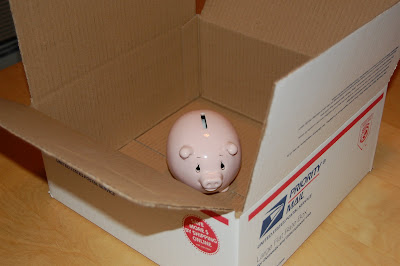
  • Larger box (domestic addresses only) $13.95 12-1/4" x 12-1/4" x 6" (sorry no pics, I don't have any of these)

Shipping Tips:

  • If you don't want to ship at the Priority rate, just pick up the free Priority boxes and wrap them in brown mailing paper and ship at the Parcel Post rate. I just thought of that the other day and I'm super proud of myself! lol
  • Make sure your items are packaged well. If there is loose space in the box, scrunch up newspapers or some other filler to make sure they won't shift around too much during shipping. If its a fragile item, wrap it in bubble wrap and make sure to let the Post Office know so they can stamp it as fragile. Make sure the address and your return address are written clearly. Seal the boxes up well with tape so they don't rip or open up during transit.
  • And the golden rule - always be honest and courteous to your buyers.

Monday, January 19, 2009

How Do I...

... do rebates? I thought it might be helpful to do some "how-to" posts about a lot of the behind-the-scenes things I do related to couponing, rebating, shopping etc. So today's post is all about the lovely world of rebates. And by the way, the pic above has absolutely nothing to do with rebates, but its just so darn'd funny!

I love, love, love rebates! Well, if you've been reading my blog for any amount of time, you've probably realized I love anything that's gonna make me some money. Rebates are a great way to do this. If you're not familiar with rebates, in a nutshell, you buy a certain product and then submit some key information to the company to get all or a percentage of your money back. Its a beautiful thing. You can find rebate forms in the newspapers, online or sometimes from tearpads found in stores.

Most rebates are limit one per household. You may have noticed I'll often do a rebate more than once. I can do this because I submit one at my address, one at my boyfriend's address and sometimes if I'm feeling spunky, one at my parent's address. Many times there will be coupons available for rebate items as well, so they become a moneymaker (ie. product is $10, use $2 coupon but get back $10 rebate check = $2 profit). And sometimes (when the stars align and the heavens smile down upon us), stores will have a rebate deal as well. Ooh!

So for example, let's look at the Orajel deal going on at Walgreens during January. Let's say you walked into Walgreens and bought Orajel for $8.50 (may actually be a little more). You could use the $1 coupon that came out in the 10/26 SS coupon insert and you'd pay $7.50 for the Orajel. Then you'd happily go home and submit your receipt information online at Walgreens' website for the Walgreens rebate of $8.50. Voila - $1 profit! But wait, we're not done yet. You'd then clip out the Orajel manufacturer's rebate from the 10/26 SS and mail off your receipt and UPC code to Orajel to get your rebate from them as well! So you'd get back $8.50 from Orajel and $8.50 from Walgreens. This is my favorite kinda rebate - a double dipper!

(EDITED to add - Walgreens no longer does rebates this way. Boo! But Rite Aid still does, so double dip to your heart's content there)

My rebate process:
  1. Shop - my favorite part, obviously!
  2. Enter receipt info at Walgreens or Rite Aid if applicable and wait for rebates to clear with them. If this is the only rebate I'm doing for this item (ie. rebate at WAG only, no manufacturer's rebate), I file the receipts into envelopes that I label "Walgreens Rebates", "DBF's Walgreens Rebates", etc. I hold onto these receipts until I get the rebate money back. If I'm also doing a manufacturer's rebate, then...
  3. Collect UPC and receipt for item, as well as rebate form if there is one (I usually keep all this together after shopping so nothing gets lost).
  4. Fill out forms and make a scanned copy of everything. I used to make a copy and have my printer print it out, but that used up tons of ink. I save them in a special folder on my computer and name them something clear, ie. "Scrubbing Bubbles - my address" or "Orajel - DBF's address"
  5. Enter the rebates into my Savings spreadsheet. I keep track of the date I mailed the rebate, the product, store I bought it at, amount of rebate, price of product, profit, how long I have to wait (ie. 6-8 weeks) and which address its coming to.
  6. Mail rebate out. Check mailbox five times a day awaiting the return of my money (I am an impatient woman)
  7. Once the rebate checks come in, I check off the rebates on my spreadsheet so I can keep track of which ones are still outstanding. I also delete the scanned copy of the rebate info.

That's all folks. I'd love to hear what you do!

Monday, December 15, 2008

I Love Rebates!


Walgreens - thanks emhalf for this great deal!

*There are cheaper face washes for $7.99, but from what the signs said in the store, the sale was on products $9.99 and up so I wasn't sure those would work for the sale. You can still make a $5 profit using the $5 off 2 coupon from Sunday's P&G insert if you don't have these home mailer coupons.

I wonder if these would also count towards the P&G Spend $50 deal. The problem would be sending receipts in for both rebates - I wonder if one or the other would take copies?

  • Progresso Soup $0.99 with in-circular coupon, used $1.10 coupon = $0.11 profit (give manufacturer's coupon first, then circular coupon)
  • 2 Skippy Peanut Butters $1.50 each, used two $0.35 coupons (11/16 RP) = $1.15 per jar
  • Diet 7-Up $0.79 (filler)
  • Used $2 RR (would have used a larger amount RR, but I wasn't 100% sure about the Olay products, so I played it safe with a lower RR), total was $7.06 - paid with gift card so zero OOP
CVS

  • Complete Multi Purpose Solution (12 oz) $8.99, used $3 ECB and $5.99 ECB, got back $8.99 ECB (Limit 2) = FREE *Also $2 coupon available (I printed my limit already)

Also picked up these great coupons. My store had them right next to the circulars.

Michaels

  • Candy melts $2.49, used 40% off coupon from circular = $1.49
  • Holiday basket $19.99, 60% off sale, paid $7.99 - this is perfect for my Secret Santa gift for my coworker. Details to come soon...

These candy melts are perfect for candy making, especially this time of year. I'm going to be using them to make some goodies this weekend.

Coupon Tip:

I learned this awesome tip from a fellow poster on the WIR Message Boards. I wasn't sure whether my $5 Olay coupons would work because the wording on them said "$5 off Olay Regenerist Moisturizer". Obviously I wanted to use them on the cleansers because those are much cheaper. So what I did was matched the first half of the coupon code with the UPC on the product. Since they matched, I knew the coupon wouldn't beep. :)

A persnickity cashier might give you trouble, but my cashier today was an awesome, really friendly young guy who does whatever as long as the register takes it. Looking at the Olay website again today, the site says the coupon is good for any Olay Regenerist Product, so I'm not sure why the coupon is worded that way. But this is a great tip to remember if you're ever unsure whether a coupon is good for a particular product.

Thursday, August 7, 2008

Walgreens Tip

As I was buying my Pop Tarts & Special K bars and then again at a different WAG where I got the Glade, I overheard customers having the same discussion with managers - they'd bought some variation of the cereal items on sale this week...but they did not get any RR's, what gives? They'd both must have done this same deal earlier in the week because they'd used the $5 RR they'd earned previously to buy the cereal today. Here's why this didn't work:
  • Walgreens advertises that Register Rewards/RR's can be used like cash on your next transaction...but that's not really the case (dirty, stinkin' liars! lol). In actuality, RR's are manufacturer's coupons that are only good at Walgreens.
  • The catch is that you can't "roll" RR's. (Rolling is when you buy an item, it earns you a reward (ie. RR at WAG, ECB at CVS, etc.), and you turn around and use that reward to buy more of the same item...to get another reward - you CAN do this at CVS with ECB's, which is one of the reasons I love CVS so much.)
  • Since RR's are manufacturer's coupons, you can't use them to buy any items from that same company that are also generating RR's. This is what tripped up the folks tonight. They were using a Kellogg's RR to buy more Kellogg's. This would have been fine if the Kellogg's hadn't been producing RR's, but since its supposed to, the second set of RR's won't print. I know, its a pain.
  • However, you can use your RR's to buy something from another company. So I could use my Kellogg's RR's from today to buy Dove chocolates and the Dove RR would print without a problem.
  • You can also use your RR's to buy pretty much anything in the store - I like to use mine for groceries whenever possible. They're usually only good for two weeks or so, so I try to use mine ASAP so I don't forget about them.

Monday, June 2, 2008

Some HCW Tips

HCW can be very confusing, so here are the tips/tricks I’ve learned from poking around there:

  1. Sign up for a free membership. Its very worth it and there are some features you can only access as a member. You can sign up here.
  2. Once you've signed up, you may need to post once or twice before you can access the Coupon Database. Once that's done, you'll see a toolbar across the top of your screen once you login. The options are: User CP, Blogs, FAQ, Members List, Coupon Resources, New Posts, Search, Quick Links and Log Out.
  3. Click on Coupon Resources and you'll see a link for Coupon Database. This is where you can search for any coupons you want. Type in the name of the product you're looking for in the "Description" tab (ie. Barilla or Pampers) and click on Search. It will tell you which paper the coupon was in or give you the link if its an online coupon.
  4. Forums - when you first login to HCW, scroll down to the second boxed area called "Swingin' Deals". This is where you'll find forums for popular stores. If you want to see what's going on in CVS land, you'd click on Drug Stores and then CVS. If you want a supermarket, you'd click on Grocery Stores and then your store. Circulars are often posted ahead of time and folks will post with ideas on how to make the deals even better.
  5. Subscriptions - Overwhelmend by going through all the forums? Join the club! You can "subscribe" to a forum and have all new posts emailed to you. This is nice since you don't have to keep going to HCW for updates. Once you're in a forum (ie. Swingin Deals, Drug Stores, CVS), you'll see a link called "Forum Tools". Click on this and then "Subscribe to Forum". You can choose how often you'd like to get email updates.
  6. New Posts - this link gives you all new posts, in all forums. I click on this every so often and scroll through and look at the ones of interest to me. On the right-hand side, it will tell you which forum the post is in (ie. CVS, Auctions, Jokes & Humor, etc.) so you don't waste time trying to read everything.

I'm sure there's tons more to do on HCW, but I'm a busy lady and this is the extent that I use HCW.